Posts

Writing Axis2 Custom Deployers - hot deployment - WSO2 Carbon Products
Image
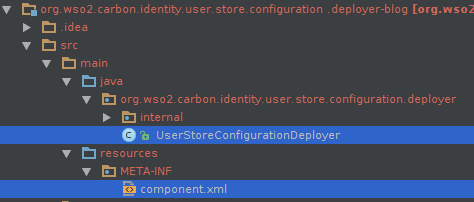
Custom deployers is a concept introduced to Axis2 to increase it's flexibility and enhance the dynamic nature. With this article on Axis2 Custom Deployers, it's originator himself explains it's background and procedure in details. With this post, I'll just share the steps I followed in using this feature. Following is the basic structure of a custom deployer. There needs to be a class that has implemented 'org.apache.axis2.deployment.Deployer' interface and a component.xml file that carries some required properties for the deployer. Following is the basic structure of a CustomDeployer class. public class CustomDeployer extends AbstractDeployer {     private static Log log = LogFactory.getLog(CustomDeployer.class);     private File userMgtConfigFile;     private RealmConfigXMLProcessor realmConfigXMLProcessor = new RealmConfigXMLProcessor();     public void init(ConfigurationContext configurationContext) {  ...

Useful Commands to Deal with SVN

The commands I came across with, while working with svn in Linux. Find and remove all the .svn folders inside a folder - This is useful when we have checkout the code from a svn repo and want to remove it from version control. find . -name .svn | xargs rm -rf Add a new folder to version control - When we have a folder that is already under version control and want to add a new one inside it. svn add Commit the made changes svn ci -m "a useful message about the commit" Remove some specific folders like target and IDE specific data from version control, but keep the data in our local machine. svn delete --keep-local <file name>  Check out a particular revision of from SVN when we know the revision number  svn co -r <revision no.> <path for the checking out folder or file> Save the difference of code to a file svn diff > <filepath>

XACML 3.0 Policies - 6

This is 6th post of a series of posts, after this post on writing XACML policies having multiple rules, http://pushpalankajaya.blogspot.com/2013/06/xacml-30-policies-multiple-rules-5.html . Here we will look into the following requirement which is more likely in practice. The operation getVesrion1 and getVersion2 in the service http://localhost:8280/services/Customers should be accessed by any user Request to any other service or operation should only be accessed by the users belong to the group(s) admin_emps or admin or both Here the policy written to meet this authorization requirement, <Policy xmlns="urn:oasis:names:tc:xacml:3.0:core:schema:wd-17"  PolicyId="testOr" RuleCombiningAlgId="urn:oasis:names:tc:xacml:1.0:rule-combining-algorithm:first-applicable" Version="1.0">    <Description>Test Or</Description>    <Target></Target>    <Rule Effect="Permit" RuleId="primary-group-emps-rule...

XACML 3.0 Policies - Multiple Rules - 5

This is the 5th post of a series of posts after the post XACML 3.0 policies - Restricting conditions - OR http://pushpalankajaya.blogspot.com/2013/06/xacml-30-policies-restricting-condition.html. Here we will look at a more practical scenario, which uses a combination of rules to satisfy the requirement which is defined as follows. The operation getEmployees in the service http://localhost:8280/services/Customers should only be accessed by the users belong to the group(s) admin_emps or admin or both Request to any other service or operation should fail But the users admin1 and admin2 should be able to access any resource irrespective of their role <Policy xmlns="urn:oasis:names:tc:xacml:3.0:core:schema:wd-17"  PolicyId="testOr" RuleCombiningAlgId="urn:oasis:names:tc:xacml:1.0:rule-combining-algorithm:first-applicable" Version="1.0">    <Description>Test Or</Description>    <Target></Target>    <Rule Eff...

XACML 3.0 policies - Restricting Condition OR - 4

This is a follow up post of the previous post on "XACML 3.0 policies - Restricting Conditions" http://pushpalankajaya.blogspot.com/2013/06/xacml-30-policies-restricting.html. There we saw how to force a user to satisfy some distinct values for a given category. Here we will see how to force to satisfy at least one of the given distinct values for a given category. The requirement is defined as follows. The operation getEmployees in the service http://localhost:8280/services/Customers should only be accessed by the users who belongs to at least one of the group(s) of admin_emps and admin. Request to any other service or operation should fail Here is the policy wrote to satisfy this requirement, <Policy xmlns="urn:oasis:names:tc:xacml:3.0:core:schema:wd-17"  PolicyId="5" RuleCombiningAlgId="urn:oasis:names:tc:xacml:1.0:rule-combining-algorithm:first-applicable" Version="1.0">    <Description>Test Or</Description...

XACML 3.0 Policies - Restricting Conditions - 3

This is the third post of a series of post, after writing XACML 3.0 policies( Writing XACML 3.0 policies, Diverse Rules Per Operation - 2 ) to satisfy several rules for different operations. With this I am to share a policy written with a much restricted condition for the rule. Following is our requirement in points. The operation getEmployees in the service http://localhost:8280/services/Customers should only be accessed by the users belong to both the groups admin_emps and admin If the user belongs to more groups than admin_emps and admin - request should fail Request to any other service or operation should fail In other words the operation should only be accessed by users belonging to both the groups admin and admin_emps, no more, no less. Here is the policy written for this requirement. <Policy xmlns="urn:oasis:names:tc:xacml:3.0:core:schema:wd-17"  PolicyId="testAnd" RuleCombiningAlgId="urn:oasis:names:tc:xacml:1.0:rule-combining-algorith...

Writing XACML 3.0 policies, Diverse Rules Per Operation - 2

This is a continuation from my previous post ' Working with XACML 3.0 policies for fine-grained authorization -1 '. Here I will share a sample XACML 3 policy which defines two distinct rules to act over two distinct resources, followed by few sample requests to understand it's behaviour. Let's imagine a requirement like as follows. The operation getCustomers in the service "http://localhost:8280/services/Customers" should only be accessed by users belonging to the admin_customers group. The operation getEmployees in the service "http://localhost:8280/services/Customers" should only be accessed by users belonging to the admin_emps group. Requests to any other service or operation should fail. I have wrote following policy to satisfy this. It's bit longer than the previous policy, but same pattern applies. <Policy xmlns="urn:oasis:names:tc:xacml:3.0:core:schema:wd-17"  PolicyId="sample" RuleCombiningAlgId=...