Posts

WSO2 Identity Server 4.5.0 brings support for dynamic configuration of multiple user stores

Image
WSO2 Identity Server 4.5.0 is going to be released by the end of this month, with a new set of features and lot of improvements to the existed features. Allowing dynamic configuration of multiple user stores is one such new addition in this release, that improves the flexibility of the server to cater changes in the production environments. This feature comes in handy when a requirement occurs to add more user stores, change some attributes of an existing user store or remove a user stores from the existing ones. With this new user store configuration UI, above scenarios can be executed smoothly and burden of editing XML files is taken away. This operates in dynamic manner that no server restart is required and changes are effective in few seconds. Here are few screen-shots of the UI to be released. The default view of user store configuration UI(Configure>User Store Management) will be as follows, when there are no secondary user stores added. (we will refer all the user...
How to Install Windows in a Virtual Machine in Linux(Ubuntu)

Recently I wanted to run Windows inside my Primary OS -  Ubuntu 12.04. I didn't want to go for dual boot option so I decided to use a virtual machine and install Windows inside Ubuntu. I faced couple of problems and here share my experience with how I overcame them. In choosing a Virtual machine I tried out 2 options. Oracle VM VirtualBox and VMware Player that is available in Ubuntu Software Centre. I could create a virtual machine successfully hitting 'new' button and following the wizard. Then I started the created machine, pointing to the CD image. It tried to load Windows files and then printed the following error on screen. Attempting to load a 64-bit application, This CPU is not compatible with 64-bit mode. But my machine has a 64 bit processor. So something has gone wrong. The issue has been my BIOS settings in the host machine has not enabled hardware virtualization. So I manually did it. My machine was a Lenovo ThinkPad T530 and could find this settin...

Hadoop Multi Node Set Up

   With this post I am hoping to share the procedure to set up Apache Hadoop in multi node and is a continuation of the post,  Hadoop Single Node Set-up . The given steps are to set up a two node cluster which can be then expanded to more nodes according to the volume of data. The unique capabilities of Hadoop can be well observed when performing on a BIG volume of data in a multi node cluster of commodity hardware.    It will be useful to have a general idea on the  HDFS(Hadoop Distributed File System) architecture which is the default data storage for Hadoop, before proceed to the set up, that we can well understand the steps we are following and what is happening at execution. In brief, it is a master-slave architecture where master act as the NameNode which manages file system namespace and slaves act as the DataNodes which manage the storage of each node. Also there are JobTrackers which are master nodes and TaskTrackers which are ...

Writing Axis2 Custom Deployers - hot deployment - WSO2 Carbon Products

Image
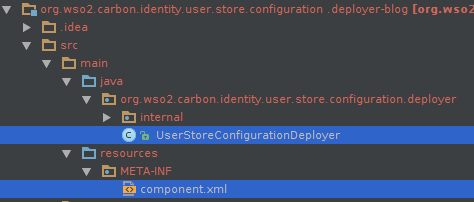
Custom deployers is a concept introduced to Axis2 to increase it's flexibility and enhance the dynamic nature. With this article on Axis2 Custom Deployers, it's originator himself explains it's background and procedure in details. With this post, I'll just share the steps I followed in using this feature. Following is the basic structure of a custom deployer. There needs to be a class that has implemented 'org.apache.axis2.deployment.Deployer' interface and a component.xml file that carries some required properties for the deployer. Following is the basic structure of a CustomDeployer class. public class CustomDeployer extends AbstractDeployer {     private static Log log = LogFactory.getLog(CustomDeployer.class);     private File userMgtConfigFile;     private RealmConfigXMLProcessor realmConfigXMLProcessor = new RealmConfigXMLProcessor();     public void init(ConfigurationContext configurationContext) {  ...

Useful Commands to Deal with SVN

The commands I came across with, while working with svn in Linux. Find and remove all the .svn folders inside a folder - This is useful when we have checkout the code from a svn repo and want to remove it from version control. find . -name .svn | xargs rm -rf Add a new folder to version control - When we have a folder that is already under version control and want to add a new one inside it. svn add Commit the made changes svn ci -m "a useful message about the commit" Remove some specific folders like target and IDE specific data from version control, but keep the data in our local machine. svn delete --keep-local <file name>  Check out a particular revision of from SVN when we know the revision number  svn co -r <revision no.> <path for the checking out folder or file> Save the difference of code to a file svn diff > <filepath>

XACML 3.0 Policies - 6

This is 6th post of a series of posts, after this post on writing XACML policies having multiple rules, http://pushpalankajaya.blogspot.com/2013/06/xacml-30-policies-multiple-rules-5.html . Here we will look into the following requirement which is more likely in practice. The operation getVesrion1 and getVersion2 in the service http://localhost:8280/services/Customers should be accessed by any user Request to any other service or operation should only be accessed by the users belong to the group(s) admin_emps or admin or both Here the policy written to meet this authorization requirement, <Policy xmlns="urn:oasis:names:tc:xacml:3.0:core:schema:wd-17"  PolicyId="testOr" RuleCombiningAlgId="urn:oasis:names:tc:xacml:1.0:rule-combining-algorithm:first-applicable" Version="1.0">    <Description>Test Or</Description>    <Target></Target>    <Rule Effect="Permit" RuleId="primary-group-emps-rule...

XACML 3.0 Policies - Multiple Rules - 5

This is the 5th post of a series of posts after the post XACML 3.0 policies - Restricting conditions - OR http://pushpalankajaya.blogspot.com/2013/06/xacml-30-policies-restricting-condition.html. Here we will look at a more practical scenario, which uses a combination of rules to satisfy the requirement which is defined as follows. The operation getEmployees in the service http://localhost:8280/services/Customers should only be accessed by the users belong to the group(s) admin_emps or admin or both Request to any other service or operation should fail But the users admin1 and admin2 should be able to access any resource irrespective of their role <Policy xmlns="urn:oasis:names:tc:xacml:3.0:core:schema:wd-17"  PolicyId="testOr" RuleCombiningAlgId="urn:oasis:names:tc:xacml:1.0:rule-combining-algorithm:first-applicable" Version="1.0">    <Description>Test Or</Description>    <Target></Target>    <Rule Eff...